


Volume Booster: Sound Booster
4.248.00 Reviews
App Specs
- Version
- 3.0
- Updated On
- License
- Free
- Downloads
- 1,000,000+
- Developer
- Switch Studio
- Categories
- Music & Audio
- Platform
- Android
Screenshots
 Analysis by AppCompare
When I want audio from my phone to cut through a noisy room, I first check the source: is the track quiet, is the phone speaker struggling, or are my headphones simply not a good fit for the moment? That distinction matters with a volume-boosting app. Turning up output can help with a soft recording, but it cannot make a small speaker behave like a home stereo. I find Volume Booster: Sound Booster most useful as a quick adjustment tool, rather than a fix for every sound problem.
A quick adjustment, not a replacement for good audio
Made by Switch Studio, this free music and audio app is for listeners who want a straightforward way to raise playback volume and shape the sound a little. It has a 4.2 average from around 6,000 ratings, and it has passed over a million installs. That gives a prospective user some context, but the practical question is whether its simple controls suit the way you listen.
I would start with a familiar song or spoken clip at a comfortable level, then make a modest adjustment and listen for changes in clarity. A louder signal can make quiet dialogue easier to follow, yet pushing sound too far may make it harsh or distorted, especially through small speakers. My advice is to increase the level in steps rather than immediately aiming for the maximum. The best setting is the one that makes the audio easier to hear without making it tiring.
Following the sound from the app to your ears
The useful workflow is simple: open the booster, choose the output you plan to use, and compare the same short section before and after adjusting it. A spoken podcast is a good test because raised voices and consonants make it easier to notice whether the result is clearer or merely louder. For music, use a track you know well; familiar vocals and bass lines help reveal when extra output starts to lose definition.
After that first check, I would leave the booster at a restrained level and switch back to the app you actually want to use. This is the point where convenience matters: the sound needs to carry over to music, video, a game, or another listening task without making you repeat the setup each time. In everyday use, a few seconds of careful comparison are more helpful than chasing a dramatic volume jump.
There is also a handoff between the phone and the listening device. A change that seems comfortable through built-in speakers can feel much stronger through headphones, while a Bluetooth speaker may have its own volume control. I treat the phone and the connected device as separate parts of the chain: start low on both, then adjust one at a time. That makes it easier to tell which control is affecting the result and helps avoid an unexpectedly loud start.
Getting Started with Volume Booster: Sound Booster
First things first, downloading and setting up the Volume Booster: Sound Booster app is a breeze. Available for both Android and iOS, you can find it easily in your app store. Once downloaded, the installation process is straightforward, with no unnecessary hoops to jump through. You launch the app, and bam—you're ready to crank up the volume.
Worth Reading Before You Choose

EA SPORTS FC Mobile 26 Is a Bigger Football Game, but It Takes Time

Flipboard Shows What News Apps Must Do Beyond the Feed

Switching to Android Auto Means Rethinking Your Driving Routine

Google Calendar Makes a Crowded Week Easier to Manage

Ludo King Makes the Most of the Minutes Between Plans

Baby Panda World Brings Quick Play to Modern Phones, but Its Game Library Feels Busy
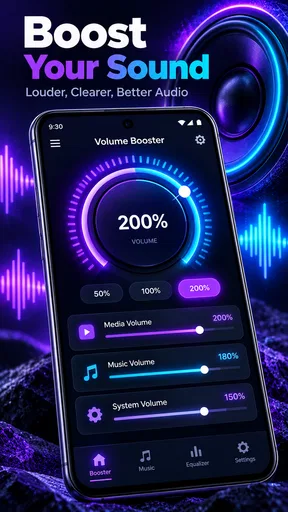
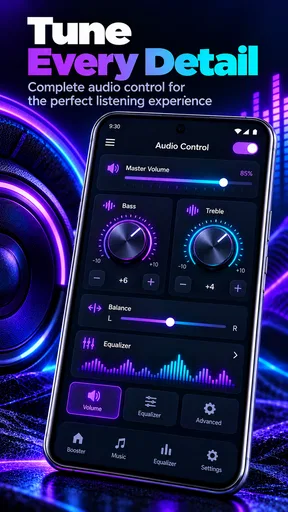
The user interface is refreshingly simple and intuitive. No clutter, just the essentials. The main screen features a large volume knob that you can turn to increase your device's sound output. It's reminiscent of those old-school stereos, bringing a touch of nostalgia to the digital age.
Functionality and Features
Now, onto the juicy details—the features. The app does exactly what it promises. You can amplify the sound of your device beyond its usual limits. Whether you’re using your smartphone’s built-in speakers or a pair of headphones, the difference is noticeable. I tested it across several audio platforms, including Spotify, YouTube, and some local music files. In each case, the app delivered enhanced volume without a hitch.
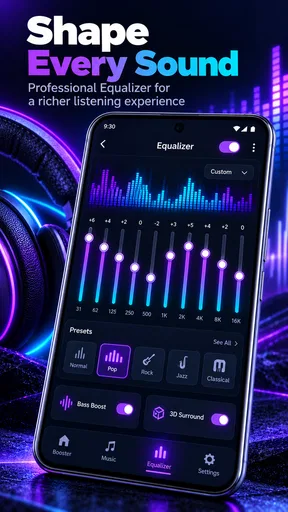
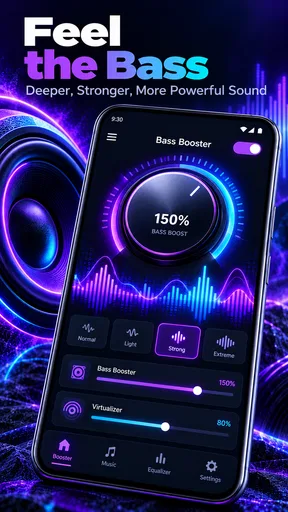
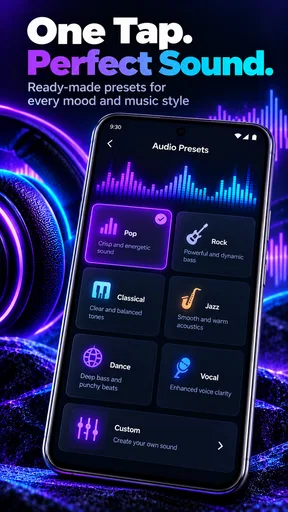
One feature I particularly appreciated was the equalizer. It allows you to customize the sound according to your preference. Want more bass? Boost it. Looking for sharper highs? You’ve got it. The equalizer offers a range of presets for different genres, which is a neat touch for music lovers who appreciate variety.
For a practical test, I would pick one preset and compare it with the unadjusted sound using the same short section of a song. Switching between presets while a track changes can make one setting seem better simply because the music has moved to a different passage. Keeping the passage constant gives a fairer comparison. I also prefer to change one thing at a time: first the overall level, then the tone. Otherwise, it is easy to mistake a bass-heavy sound for a genuinely clearer one.
The equalizer is most useful when the problem is tonal balance rather than raw loudness. If speech sounds thin, a small adjustment may make it easier to follow; if a song already has heavy bass, adding more can muddy vocals instead. Presets are a convenient starting point, not a rule. I would switch back to a neutral setting for unfamiliar recordings or spoken content before making broad changes, then keep only adjustments that improve the material I actually listen to.
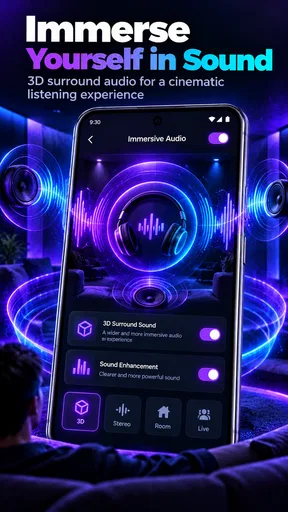
Another interesting aspect is that it works in conjunction with other apps. So, whether you’re gaming or watching a movie, you can enjoy that boosted audio without having to exit your current application. It's seamless integration at its finest.
That cross-app approach is helpful when the quiet audio is not coming from a music player. Imagine watching a clip on the bus and struggling to hear a line over the surrounding noise: a quick adjustment can be more convenient than searching for a separate control inside every media app. At home, the same idea can help with a game whose dialogue sits lower than its effects. I would still avoid turning up the phone aggressively in a public place; headphones or moving somewhere quieter may be a better answer than raising the level for everyone nearby.
Performance and Experience
During my time with Volume Booster: Sound Booster, I didn't encounter any significant lag or crashes. The app runs smoothly, and the impact on battery life is minimal, which is always a plus. No one wants an app that drains your battery faster than you can say "volume." The app developers seem to have optimized it well, ensuring a balanced performance.
The app supports Bluetooth connections, which means you can enjoy boosted sound through your wireless speakers or headphones. This is perfect for parties or just when you're lounging around at home.
Bluetooth is also where I would be especially deliberate about the handoff. A wireless headset, a portable speaker, and the phone itself may each have different output behavior, so I would not assume a level that worked on one will feel the same on another. Before handing a speaker to someone else or switching from a speaker to earbuds, lower the output first and bring it back up gradually. That small habit is more reliable than trusting a remembered setting.
For a relaxed evening at home, a sensible sequence might be to connect a Bluetooth speaker, begin with its own volume low, and play a familiar track before making any changes in the booster. If the speaker already sounds clear, the app may not add anything worthwhile. If a recording is quiet, a modest increase can help, but a room-filling sound still depends on the speaker and the room. This is a useful distinction: the app can adjust the signal, while the physical device sets limits on how full and clean the sound can be.
People often ask whether a booster is better than the volume controls already built into a phone or media player. I see them as different steps, not direct substitutes. The built-in controls are the simplest and safest first stop; the app is worth trying when those controls do not make a quiet source comfortable enough. If you routinely need much more volume, checking the recording, headphone fit, speaker placement, or the device’s own audio settings may solve the problem more cleanly.
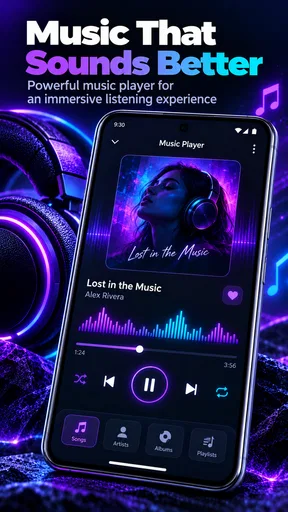
Compared with a full music player or dedicated audio-editing tool, this app’s appeal is its directness. It is for changing playback in the moment, not organizing a library or repairing an audio file. If you want to edit a recording permanently, a sound editor is a better fit. If you are chasing a carefully calibrated listening setup, dedicated equalizer controls on your device or audio equipment may offer a more suitable route. For a quick boost across ordinary listening, a simpler interface can be an advantage rather than a missing professional feature.
There are a few sensible reasons to skip it. If your sound is already clear and comfortably loud, adding another control layer may be unnecessary. If your main issue is a damaged speaker, poor-quality headphones, or loud surroundings, boosting may not address the cause. And if you are sensitive to sharp or distorted sound, it is better to keep the level conservative than to treat maximum output as the goal. I would also be cautious about prolonged listening at high volume; comfort and hearing come before squeezing more output from a phone.
The app is free to download, with in-app purchases ranging from $1.99 to $49.99 per item. It is rated for Everyone, and version 3.0 runs on Android 7.0 or later. I would try the basic experience first and decide whether the controls are useful in my own routine before considering any purchase. That is a more grounded way to judge a sound utility than assuming extra spending will solve a hardware or source-quality limitation.
Final Thoughts
In conclusion, if you’re on the hunt for an app that can genuinely enhance your mobile audio experience, the Volume Booster: Sound Booster app is worth a download. It’s user-friendly, effective, and doesn’t mess with your device’s performance. The equalizer is a standout feature, offering customizability that audiophiles will appreciate.
So, if you’re tired of straining to hear your favorite song or want to feel more immersed in a game, give this app a shot. It’s like having a mini amplifier in your pocket, ready to pump up the jams wherever you are.
With its handy features and seamless operation, the Volume Booster: Sound Booster app is a definite win in my book. Download it, and let your ears enjoy the ride!
My recommendation is strongest for someone who regularly encounters quiet tracks, videos, or game audio and wants a quick way to experiment with louder playback and tonal changes. It is less compelling for a listener who expects a phone app to overcome weak hardware or make every source sound studio-clean. Used in small steps, with a familiar clip as a reference and a lower level whenever the output device changes, it can be a handy part of a listening routine without becoming something you have to fiddle with constantly.
Pros
- Enhances audio quality significantly.
- Easy-to-use interface for quick adjustments.
- Compatible with most apps and media.
- Customizable sound profiles available.
- Small app size
- doesn't consume much space.
Cons
- May distort sound at maximum levels.
- Contains in-app ads that can be intrusive.
- Limited free features; most require purchase.
- Requires Android 5.0 and up.
- Can drain battery faster when in use.
FAQs for Volume Booster: Sound Booster
What is Volume Booster: Sound Booster and how does it work?
Volume Booster: Sound Booster is an app designed to enhance the audio output of your device beyond its default limits. It works by modifying the audio settings and amplifying the sound produced by your speakers or headphones. This app is perfect for users who need louder audio for music, videos, or calls.
Is Volume Booster: Sound Booster safe to use on my device?
Yes, Volume Booster: Sound Booster is safe to use if downloaded from a reputable source like Google Play Store or Apple App Store. However, it's important to use the app responsibly, as excessive volume levels can potentially damage your device's speakers or your hearing.
Does Volume Booster: Sound Booster work on all types of audio content?
Volume Booster: Sound Booster is compatible with most audio content, including music, videos, and phone calls. However, the effectiveness can vary depending on the specific audio format and the capabilities of your device. Users should test the app with different types of audio to see how well it performs.
Will using Volume Booster: Sound Booster affect my device's battery life?
Using Volume Booster: Sound Booster may slightly impact your device's battery life, as it requires additional processing power to amplify sound. However, the effect is usually minimal. To conserve battery, consider using the app only when necessary or keeping the volume boost at moderate levels.
Are there any alternatives to Volume Booster: Sound Booster?
Yes, there are several alternatives to Volume Booster: Sound Booster, each with unique features and interfaces. Popular alternatives include Super Volume Booster, Equalizer FX, and Bass Booster. Users should explore different apps to find the one that best suits their audio enhancement needs.


